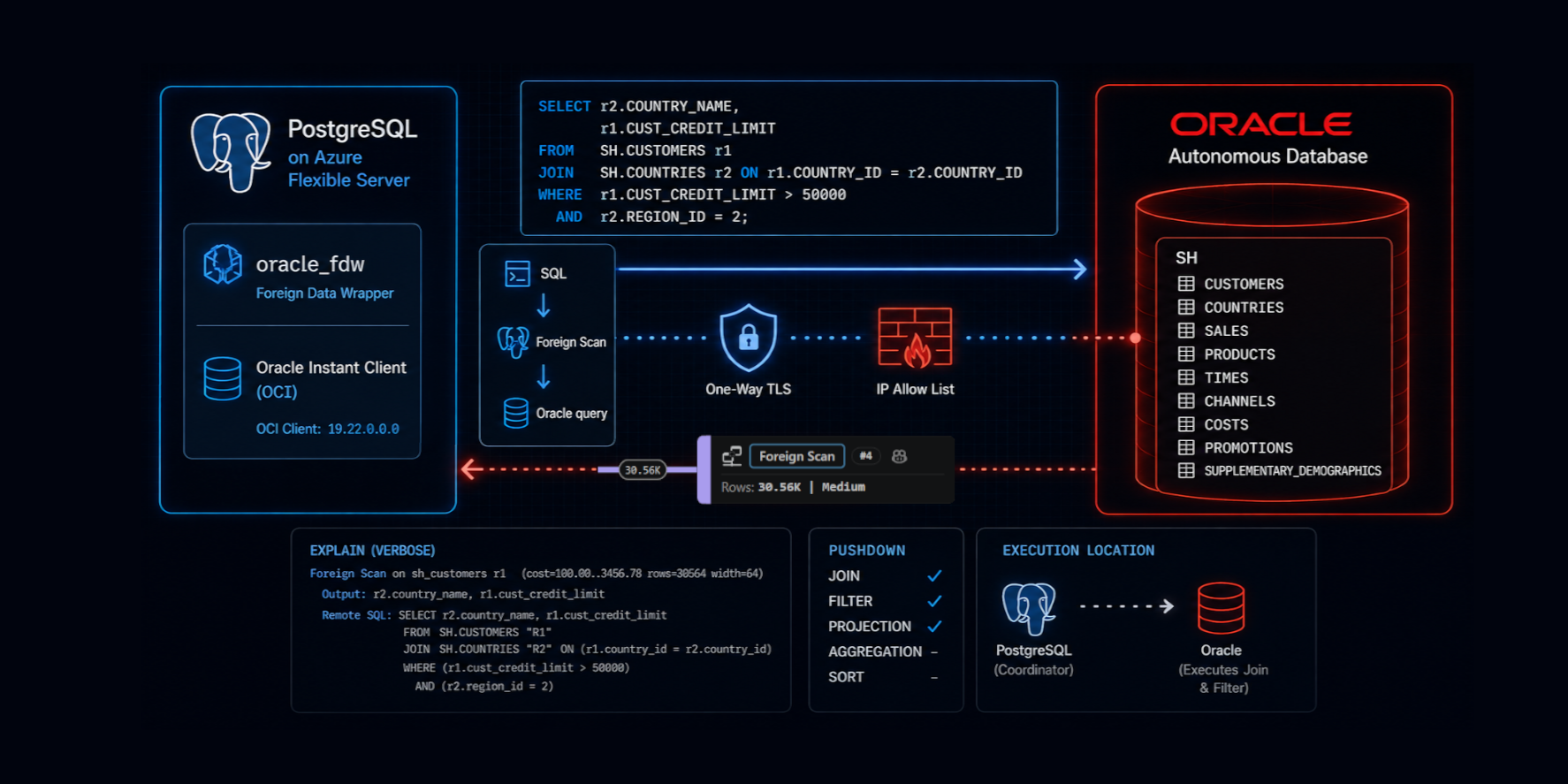
When migrating databases to PostgreSQL, not all data transitions happen immediately. Applications often need to keep accessing legacy databases for reading or writing, whether during a phased migration, for reporting, or because certain data still lives in another system. PostgreSQL implements parts of the SQL/MED standard via Foreign Data Wrappers (FDW), enabling queries against tables stored in external systems as if they were local. Instead of building ETL pipelines or copying data periodically, PostgreSQL can access remote data directly and let the query planner decide what to execute remotely.
In this article, I'll connect Azure Database for PostgreSQL Flexible Server to an Oracle Autonomous Database using oracle_fdw, a Foreign Data Wrapper maintained by Laurenz Albe. I'll show how to:
- connect PostgreSQL to Oracle over TLS (Transport Layer Security)
- discover the outbound IP address used by Azure Database for PostgreSQL
- import Oracle tables as PostgreSQL foreign tables
- examine how filters and join operations are pushed down to Oracle
- perform INSERT, UPDATE, and DELETE operations on Oracle tables from PostgreSQL
- migrate from Oracle to PostgreSQL with a Create Table As Select over FDW
- run hybrid queries to compare remote and local tables after migration
The goal is not to build a distributed database or a distributed transaction system. The goal is to access Oracle data from PostgreSQL with minimal setup while letting each database do the work it can do most efficiently.
Enable the Foreign Data Wrapper
To enable ORACLE_FDW, I selected it in the server parameters allowed extensions:
Another option is to include it in the ServerParameter entry of an ARM template. In both cases, it is easy to check:
postgres=> \dconfig azure.extensions

                      List of configuration parameters

    Parameter     |             Value
------------------+-------------------------------------------------
 azure.extensions | ORACLE_FDW

(1 row)
Open the firewall and get the connection string
I will connect to the Oracle Autonomous Database over the public internet. The security measures include user-password authentication, an encryption certificate, and a firewall with an IP whitelist. Since I am unsure which IP address Azure Database for PostgreSQL will use when connecting, I currently permit connections from any IP to my Oracle Autonomous Database:
I didn’t select “Secure access from everywhere” because it requires mutual TLS (mTLS) with client certificates stored in a wallet on the client device. Since the client is an Azure PostgreSQL managed service and I can’t install a custom wallet, I chose one-way TLS (encryption without a client wallet), which is a practical option in this setup, as Oracle server certificates chain to public CAs trusted by Azure/PostgreSQL trust stores. This approach requires whitelisting IP addresses or a CIDR range. For testing, I temporarily allowed 0.0.0.0/0 to connect and capture the real source IP address for future adjustments. I did this only to identify the source IP used by Azure Database for PostgreSQL. In sensitive database environments, avoid allowing 0.0.0.0/0 even for a short time. Instead, use an ephemeral Oracle Autonomous test instance to identify the PostgreSQL server’s source IP address.
You will need a username and password to connect, along with the connection string shown in the database connection details:
I recommend using the TP or LOW services because MEDIUM and HIGH are intended for data warehouse workloads, which can cause unexpected locking behavior or resource usage.
In my case, the connection string is:
(description=(retry_count=20)(retry_delay=3)(address=(protocol=tcps)(port=1521)(host=adb.eu-madrid-1.oraclecloud.com))(connect_data=(service_name=g230b6bb64a62e6_mad_tp.adb.oraclecloud.com))(security=(ssl_server_dn_match=yes)))
That's everything I need on the Oracle side. I have all the information needed to connect from PostgreSQL.
Declare the Foreign Data Wrapper server
I connect to the Azure PostgreSQL server with psql and enable the ORACLE_FDW extension:
postgres=> create extension oracle_fdw;

CREATE EXTENSION
I declare the connection string for the foreign data wrapper server:
postgres=> create server oracle_autonomous
  foreign data wrapper oracle_fdw
  options (dbserver '(description=(retry_count=20)(retry_delay=3)(address=(protocol=tcps)(port=1521)(host=adb.eu-madrid-1.oraclecloud.com))(connect_data=(service_name=g230b6bb64a62e6_mad_tp.adb.oraclecloud.com))(security=(ssl_server_dn_match=yes)))');

CREATE SERVER
I declare the Oracle username and password to be used by my current user:
postgres=> create user mapping for current_user
  server oracle_autonomous
  options (user 'ADMIN', password '<password on Oracle Autonomous>');

CREATE USER MAPPING
To check if the connection is correct, I call oracle_diag(), which shows the client-side versions as well as the major version of the server:
postgres=> select oracle_diag('oracle_autonomous')
;
                                      oracle_diag
----------------------------------------------------------------------------------------
 oracle_fdw 2.8.0, PostgreSQL 18.4, Oracle client 23.26.0.0.0, Oracle server 23.0.0.0.0

(1 row)
As the server version is returned, I know that I'm connected.
If it cannot connect, you must verify the connection string, the IP allow list, and the credentials.
Discover the public outbound IP address
Since I don't want to keep the firewall open to 0.0.0.0/0 indefinitely, and rely solely on password-based protection, I first identify the IP address I'm connected from to narrow down the allowed IP list:
postgres=> select oracle_execute('oracle_autonomous',$$
 begin -- PL/SQL block to raise an exception that carries the IP address information
  raise_application_error(
   -20999,
   'Hello ' || user||'@'||sys_context('userenv','ip_address')
  );
 end;
$$);

ERROR:  error executing statement: OCIStmtExecute failed to execute query
DETAIL:  ORA-20999: Hello ADMIN@4.203.152.223
ORA-06512: at line 3
The error message is expected because I used raise_application_error() to return a message to oracle_execute(), which does not accept statements that return a result.
Now I can replace CIDR 0.0.0.0/0 with the IP address of the Azure PostgreSQL server I'm connecting from:
Note that Azure does not guarantee that this public address remains static, so this rule may need updating after maintenance or failover. For production where such FDW access is long-term and highly available, use an architecture that provides controlled egress IPs (for example via NAT) that you can allowlist, or private connectivity where available.
Since ORACLE_FDW allows me to connect and perform DML on the Oracle side, I have no other tasks on the Oracle side. PostgreSQL is my Oracle client.
Import Oracle table metadata
Back at my psql prompt, I can import the metadata for the Oracle schema "SH" into the PostgreSQL schema "fdw_sh":
postgres=> create schema fdw_sh
;

CREATE SCHEMA

postgres=> import foreign schema "SH"
           from server oracle_autonomous into fdw_sh
;

IMPORT FOREIGN SCHEMA
I can describe what is imported:
postgres=> set search_path TO fdw_sh, public
;

postgres=> \d
                      List of relations
 Schema |            Name            |     Type      | Owner
--------+----------------------------+---------------+--------
 fdw_sh | channels                   | foreign table | franck
 fdw_sh | costs                      | foreign table | franck
 fdw_sh | countries                  | foreign table | franck
 fdw_sh | customers                  | foreign table | franck
 fdw_sh | products                   | foreign table | franck
 fdw_sh | promotions                 | foreign table | franck
 fdw_sh | sales                      | foreign table | franck
 fdw_sh | supplementary_demographics | foreign table | franck
 fdw_sh | times                      | foreign table | franck
(9 rows)
Those are the tables imported from the "SH" schema of the Oracle database.
ORACLE_FDW has automatically mapped the data types to PostgreSQL data types:
postgres=> \d fdw_sh.countries

                               Foreign table "fdw_sh.countries"

        Column        |         Type          | Collation | Nullable | Default | FDW options
----------------------+-----------------------+-----------+----------+---------+--------------
 country_id           | numeric               |           | not null |         | (key 'true')
 country_iso_code     | character(2)          |           | not null |         |
 country_name         | character varying(40) |           | not null |         |
 country_subregion    | character varying(30) |           | not null |         |
 country_subregion_id | numeric               |           | not null |         |
 country_region       | character varying(20) |           | not null |         |
 country_region_id    | numeric               |           | not null |         |
 country_total        | character varying(11) |           | not null |         |
 country_total_id     | numeric               |           | not null |         |
 country_name_hist    | character varying(40) |           |          |         |
Server: oracle_autonomous
FDW options: (schema 'SH', "table" 'COUNTRIES')
It is recommended to run ANALYZE to ensure the PostgreSQL query planner knows the cardinalities. Note that foreign tables are not automatically analyzed by auto-analyze.
postgres=>  select format('analyze verbose %I.%I;', table_schema, table_name)
            from information_schema.tables
            where table_schema = 'fdw_sh'
\gexec
PostgreSQL doesn't automatically collect statistics on foreign tables. Without running ANALYZE, the optimizer might misjudge row counts, resulting in suboptimal join plans and fewer pushdown opportunities. By default, ANALYZE reads 100% of the table but it can be lowered for large table by setting the sample percentage beforehand:
postgres=> alter foreign table fdw_sh.sales options (set sample_percent '5')
;
ALTER FOREIGN TABLE
Query the foreign tables
I can query foreign tables just like local ones. For example, to find the total customer credit exposure by country for certain regions, I run the following:
postgres=> -- explain (analyze, verbose, buffers)
           select
            co.country_name,
            sum(cu.cust_credit_limit) as total_credit
           from fdw_sh.customers cu
           join fdw_sh.countries co on co.country_id = cu.country_id
           where co.country_region in ('Europe')
           group by co.country_name
           having sum(cu.cust_credit_limit) > 1e7
           order by total_credit desc
;

  country_name  | total_credit
----------------+--------------
 Germany        |     49579000
 United Kingdom |     45205500
 Italy          |     44844500
 France         |     23987000
 Spain          |     12170000

(5 rows)
The execution plan indicates the operations that have been delegated to the foreign database:
 Sort  (cost=253237.64..253237.64 rows=3 width=41) (actual time=10348.498..10348.500 rows=5.00 loops=1)
   Output: co.country_name, (sum(cu.cust_credit_limit))
   Sort Key: (sum(cu.cust_credit_limit)) DESC
   Sort Method: quicksort  Memory: 25kB
   ->  GroupAggregate  (cost=253056.49..253237.61 rows=3 width=41) (actual time=10343.320..10348.489 rows=5.00 loops=1)
         Output: co.country_name, sum(cu.cust_credit_limit)
         Group Key: co.country_name
         Filter: (sum(cu.cust_credit_limit) > '10000000'::numeric)
         Rows Removed by Filter: 3
         ->  Sort  (cost=253056.49..253116.81 rows=24130 width=14) (actual time=10342.473..10343.918 rows=30564.00 loops=1)
               Output: co.country_name, cu.cust_credit_limit
               Sort Key: co.country_name
               Sort Method: quicksort  Memory: 1783kB
               ->  Foreign Scan  (cost=10000.00..251300.00 rows=24130 width=14) (actual time=51.461..10333.852 rows=30564.00 loops=1)
                     Output: co.country_name, cu.cust_credit_limit
                     Oracle query: SELECT /*47caada6fd16dcb0*/ r2."COUNTRY_NAME", r1."CUST_CREDIT_LIMIT" FROM ("SH"."CUSTOMERS" r1 INNER JOIN "SH"."COUNTRIES" r2 ON (r1."COUNTRY_ID" = r2."COUNTRY_ID") AND (r2."COUNTRY_REGION" = 'Europe'))
                     Oracle plan: SELECT STATEMENT
                     Oracle plan:   HASH JOIN   (condition "R1"."COUNTRY_ID"="R2"."COUNTRY_ID")
                     Oracle plan:     TABLE ACCESS FULL COUNTRIES  (filter "R2"."COUNTRY_REGION"='Europe')
                     Oracle plan:     TABLE ACCESS FULL CUSTOMERS
 Query Identifier: -2654414372183047898
 Planning Time: 152.202 ms
 Execution Time: 10348.595 ms
The most important line in the execution plan is the generated Oracle query. It shows exactly which operations PostgreSQL delegated to Oracle and how many rows were returned across the network. In this example, the join and filter were pushed down: it executed a hash join with the COUNTRIES table as the build table and the CUSTOMERS table as the probe table, returning 30564 rows. The aggregation happened in PostgreSQL.
Here is the visualization in the VS Code extension for PostgreSQL:
Checking the execution plan is essential because remote calls introduce latency. We should minimize roundtrips and avoid reading excessive rows that will be discarded later.
Execute DML (read and write)
Unlike many federation technologies, oracle_fdw supports direct INSERT, UPDATE, and DELETE operations on Oracle tables from PostgreSQL. I use oracle_execute() to create a new table on the remote Oracle Database:
postgres=> select oracle_execute(
  'oracle_autonomous',
  $$
    create table "REGIONS" (
      ID   number primary key,
      NAME varchar2(100) unique
    )
  $$
);

 oracle_execute
----------------

(1 row)


postgres=> select oracle_close_connections()
;

 oracle_close_connections
--------------------------

(1 row)
After executing DDL through oracle_execute(), I close the cached Oracle connection because, in my tests, Oracle’s implicit DDL commit left oracle_fdw’s transaction state out of sync, causing subsequent queries on the same remote session to fail with ORA-08177 ("can't serialize access for this transaction").
I am able to declare the foreign table and insert rows through it:
postgres=> create foreign table regions (
  id numeric options (key 'true'),
  name text
)
server oracle_autonomous
options (schema 'ADMIN', table 'REGIONS')
;

CREATE FOREIGN TABLE

postgres=> insert into regions (name, id)
           select distinct country_region, country_region_id
           from fdw_sh.countries
;

INSERT 0 6
To demonstrate that DML occurs on the Oracle Database, I attempt to insert a duplicate, which results in an Oracle error:
postgres=> insert into regions values (1,'Europe')
;

ERROR:  error executing query: OCIStmtExecute failed to execute remote query
DETAIL:  ORA-00001: unique constraint (ADMIN.SYS_C0035974) violated on table ADMIN.REGIONS columns (NAME)
ORA-03301: (ORA-00001 details) row with column values (NAME:'Europe') already exists
Help: https://docs.oracle.com/error-help/db/ora-0000
Remote queries are supported for transactions:
postgres=> begin;

BEGIN

postgres=*> delete from regions;

DELETE 6

postgres=*> select * from regions;

 id | name
----+------
(0 rows)

postgres=*> rollback;

ROLLBACK

postgres=> select * from regions;

  id   |    name
-------+-------------
 52800 | Africa
 52801 | Americas
 52802 | Asia
 52803 | Europe
 52804 | Middle East
 52805 | Oceania
(6 rows)
The remote delete was executed but later reversed through a rollback in the local transaction. You can check when the remote transaction starts and ends by setting client_min_messages to debug. You can query both local and remote tables within a single local transaction (without two-phase commit or distributed transaction guarantees). However, this does not provide consistent guarantees for distributed transactions.
Hybrid queries
An SQL statement can involve local and remote tables. Here is an easy way to import data from Oracle to PostgreSQL:
postgres=> create table local_customers as
            select * from fdw_sh.customers
;

CREATE TABLE

postgres=> alter table local_customers
             add primary key (cust_id)
;

ALTER TABLE

postgres=> vacuum analyze local_customers
;

VACUUM
A SQL statement can join local and remote tables. Here is an easy way to compare two tables:
postgres=> select l.cust_id, r.cust_id
            -- full outer join to read all rows from both tables
            from local_customers l
            -- push down order by to favor merge join
            full outer join (
               select * from fdw_sh.customers order by cust_id
               ) r using (cust_id)
            -- eliminate the same rows
            where
                -- one cust_id row doesn't exist in the other
                l.cust_id is null or r.cust_id is null
                -- or it exists in both but with difference values
                or l is distinct from r
;
To compare them, all rows must be read, but this execution plan is efficient, using a sort-merge join that compares rows without buffering them into a temporary table.
This comparison is long and may produce false positives if concurrent DML operations occur while logical replication runs during the migration. Nevertheless, since both databases utilize multi-version concurrency control snapshots and their transactions started nearly simultaneously when using autocommit or serializable transactions, the likelihood of false positives is low. To deal with transient differences, you can quiesce writes, compare only a known past time window, or recheck reported rows after replication catches up.
Limitations
The foreign data wrapper is not a distributed query engine. It pushes only certain operations when it improves performance. For example, in the previous case, Oracle performed the join and filter, but PostgreSQL executed the GROUP BY.
| Operation | Pushdown |
|---|---|
| WHERE | ✅ Yes (only expressions that can be safely translated) |
| JOIN | ✔️ Yes, between two foreign tables on the same foreign server when the join conditions and filters can be translated |
| ORDER BY | ✔️ Yes, except for string-based sort and when a join is pushed down |
| GROUP BY | ❌ (no aggregation pushdown in oracle_fdw 2.8.0) |
| INSERT/UPDATE/DELETE | ✅ |
| Joins over 3 foreign tables | ❌ No |
| PostgreSQL functions | ❌ No, except now(), transaction_timestamp(), current_timestamp, current_date, localtimestamp which are translated and pushed down |
Queries continue to be transmitted over the network. If pushdown isn't feasible, large result sets can slow down performance. Foreign tables are not automatically analyzed. Cross-database transactions are not managed as distributed transactions. oracle_fdw is ideal for access, reporting, and migration, but it does not substitute for physically transferring heavily used data into PostgreSQL.
Conclusion
ORACLE_FDW is simple to enable on Azure Database for PostgreSQL Flexible Server and provides a simple way to access Oracle data from PostgreSQL without introducing a separate replication or ETL layer. Oracle tables appear as PostgreSQL foreign tables, can join with local tables, and support read-write operations.
The key feature is visibility. PostgreSQL's execution plan shows not only local operations but also the SQL sent to Oracle, along with the Oracle execution plan. This helps users easily see which parts are executed remotely and which stay on PostgreSQL.
As with all Foreign Data Wrappers, performance depends on how much work you delegate to the remote database. Pushdown candidates typically include filters, joins, and sorting. PostgreSQL executes aggregation locally rather than delegating it to Oracle. Network latency and data transfer costs also play a significant role.
For migrations, reporting, data validation, or gradual application modernization, oracle_fdw provides an effective solution to connect PostgreSQL and Oracle while using standard SQL on both platforms. It does not try to treat multiple databases as a single distributed system.
If you used the Oracle Foreign Data Wrapper, please share your questions, comments, and feedback in the PostgreSQL Hub Developer Forum.